To: WRS Health Users
From: WRS Development Team
Date: 07/14/2026
Re: Configure Note Format -Preferences
Items in This Release
- Configure Note Format - Provider Preferences
Providers can now manage their available Note Formats directly from EMR Preferences, eliminating the need to open a patient chart to enable or disable note formats. This enhancement provides a faster and more convenient way for providers to personalize their documentation workflow.
This feature was introduced in response to provider feedback requesting easier access to note format configuration outside of the charting process.
What’s New
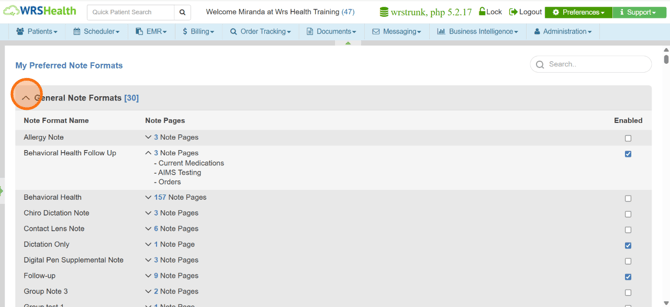
- A new My Preferred Note Formats option is available under Preferences > EMR Preferences.
- Providers can enable or disable individual note formats to match their documentation preferences.
- The Note Format dropdown (used when creating or editing a patient note) now automatically reflects only the formats a provider has enabled, giving faster access to preferred templates.
Why It Matters
By curating their own list of preferred note formats, providers spend less time scrolling through unused templates and can chart faster with the formats that matter most to their specialty and workflow.
How It Works
- Go to Preferences > EMR Preferences.
- Click My Preferred Note Formats.
- Expand or collapse each category to view the available note formats.
- Select a note format to review its component sections/pages, if needed.
- Enable or disable note formats based on your preferred documentation workflow.