
This release introduces Note Section Management in WRS Admin, providing a centralized way to manage and organize note sections used across Note Formats.
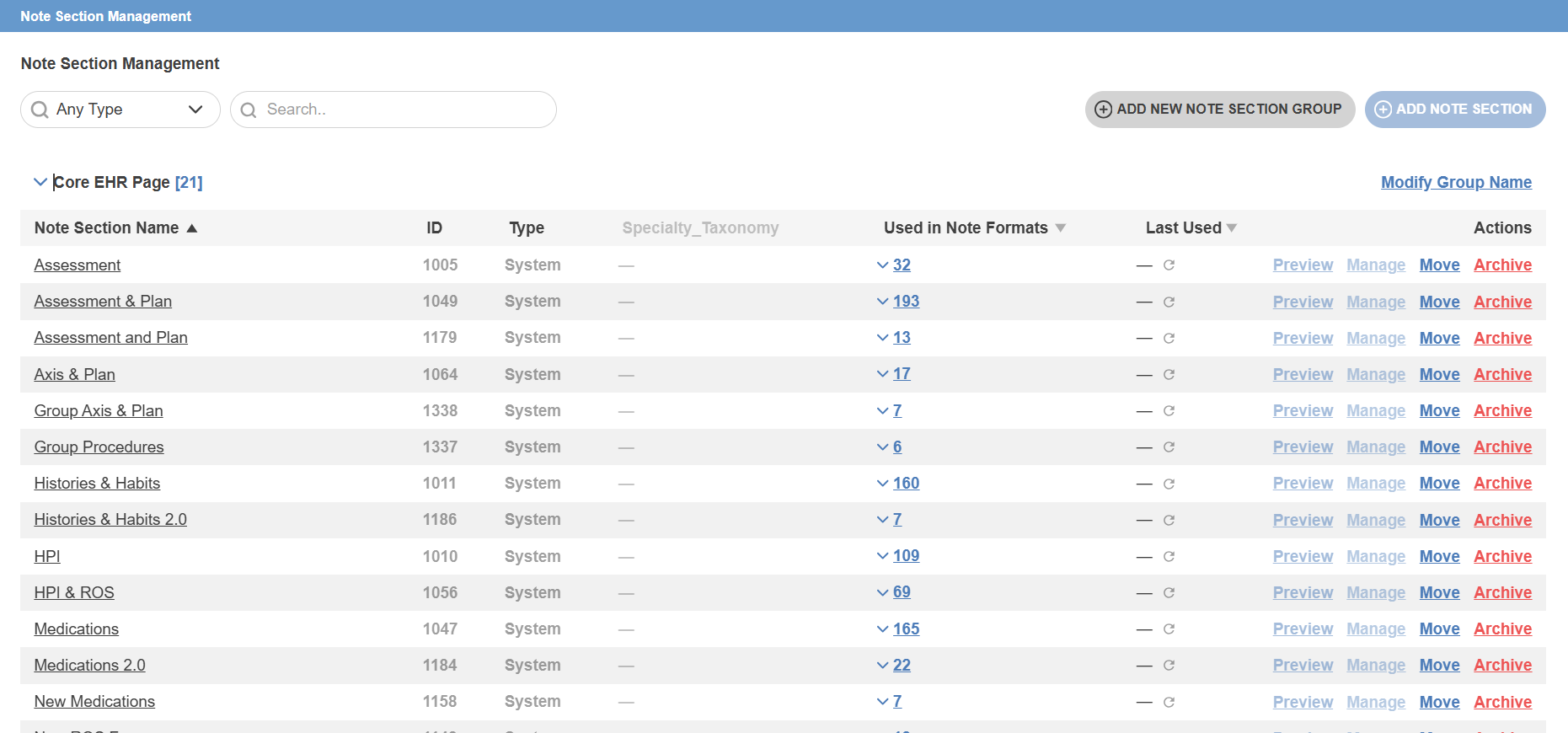
With this enhancement, WRS Admin users can view key details for each note section, including the section name, type, last used date, and the Note Formats where the section is currently used. This gives administrators better visibility into how note sections are structured, organized, and reused across documentation templates.
The list is grouped by Group Name, making it easier to organize related sections and manage them in a more structured way. Users can also create new groups, classify sections under the appropriate group, and move sections between groups as needed.
What’s New
Centralized Note Section Management
WRS Admin users can now manage note sections from one centralized location.
Grouped Section List
Note sections are displayed by Group Name for easier review and organization. Users can also review the Last Used Date and Note Format usage count to help decide whether a section should stay active, be moved, or be archived.
Create and Manage Groups
Users can create section groups to better organize note sections based on category, purpose, or workflow. Sections can be assigned to a group so they are easier to find, review, and manage. Users can move a section from one group to another when organization or workflow needs change.
Archive and Unarchive Sections
Similar to Note Format Management, users can archive sections that are no longer actively needed and unarchive them when they need to be used again.
Impact and Benefits
Improved organization of note sections
Grouping sections helps keep the Note Format setup cleaner, more structured, and easier to maintain.
Better visibility into section usage
WRS Admin users can see where each section is being used across Note Formats and review the Last Used Date to help identify active or unused note sections.
This makes it easier to manage reusable content, keep needed sections active, and archive sections that are no longer being used.
Easier maintenance of documentation templates
By viewing section details and usage, admins can better understand which sections are active, reused, or may need review.
More flexible section management
Users can create groups, classify sections, move sections between groups, and archive or unarchive sections as documentation needs evolve.
Cleaner section library
Archive functionality helps keep the active section list focused and organized without permanently removing sections from the system.
Reduced duplication and confusion
Clear section details, group organization, and archive controls help reduce duplicate, outdated, or misplaced sections across Note Formats.
How It Works
Create Group → Classify Section → Review Section Details → Move or Archive Section → Use in Note Formats
- WRS Admin user goes to Note Section Management.
- The system displays note sections grouped by Group Name.
- Users can view section details, including name, type, last used date, and related Note Formats.
- Users can create a new group to organize sections.
- Users can move (classify) a section under the appropriate group.
- Users can archive sections that are no longer actively used.
- Users can unarchive sections when they need to be available again.
For the complete admin workflow, please refer to the full User Guide > Note Section Management.