
To: WRS Health Users
From: WRS Product & Development Team
Date: 09/22/2026
Re: WRS Tools & App Launcher
Items in This Release
- WRS Tools & App Launcher
As the number of applications and tools available to users continues to grow, individual buttons for features such as AI Scribe Summary, MobileMD Summary, Voice Recorder, Drawing Tool etc… can make the interface more difficult to navigate.
With the new WRS App Launcher, these applications and tools are brought together in one centralized location. Users can quickly access available tools through a hover-based launcher, keeping the interface cleaner while making applications easier to find.
The App Launcher will be available across all practices. User access remains role-based, so users will only see applications available to them based on their permissions and activation.
What’s New
The WRS App Launcher provides a centralized location for accessing applications and tools within the EHR.
Key improvements include:
- Centralized access to applications and tools
- Hover-based launcher for quick access
- Reduced need for scattered feature buttons throughout the EHR
- A cleaner and more organized interface
- Continued role-based access and permissions
- Availability across all practices
- Support for both external and internal users
Tools that may be accessed through the App Launcher include:
|
Tool / App |
What It Does |
|
CCDA Record Agent |
Enables users to inquire across all available patient record resources, receive AI-generated summaries of relevant clinical information, and support the exchange of patient information. |
|
Request External Record |
Allows users to request clinical records from an external source. |
|
2D Body Map |
Provides a visual body map for documenting or indicating areas of the patient’s body. |
|
Pre-Encounter Interview |
Captures patient information before the encounter to help prepare for the visit. |
|
AI Scribe Summary |
Uses AI to generate a summary of the patient encounter from the available visit information. |
|
MobileMD Summary |
Provides an AI-generated summary from the MobileMD Ambient Listening workflow. |
|
ROS Summary |
Generates an AI-powered summary of the patient’s Review of Systems (ROS) information to support clinical documentation. |
|
Telehealth Summary |
Generates an AI-powered summary of information from a telehealth encounter. |
|
Follow-up Summary |
Generates an AI-powered summary to support follow-up documentation. |
|
Clinical Practice Guidelines (CDS) |
Provides access to clinical decision support and practice guideline information. |
|
Drawing Tool |
Allows providers to create drawings or annotations as part of clinical documentation. |
|
Voice Recorder |
Allows providers to record voice information for use within the applicable workflow. |
Available applications may vary based on user role, permissions, and application activation.
How It Works
- In your EHR, from the Today’s Appointment List or through patient search, open the patient’s encounter notes to document.
- Hover over the Tools & Apps Launcher within the patient’s notes to display the applications available.
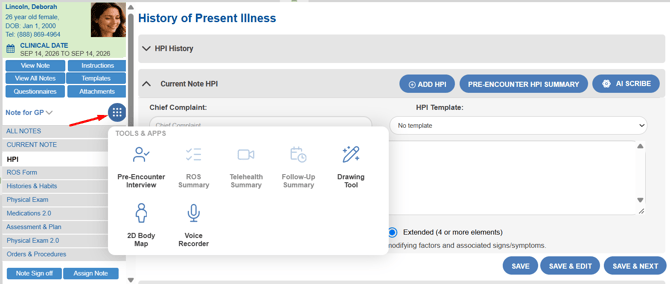
- Select the desired application or tool.
- The selected application launches within the appropriate workflow.
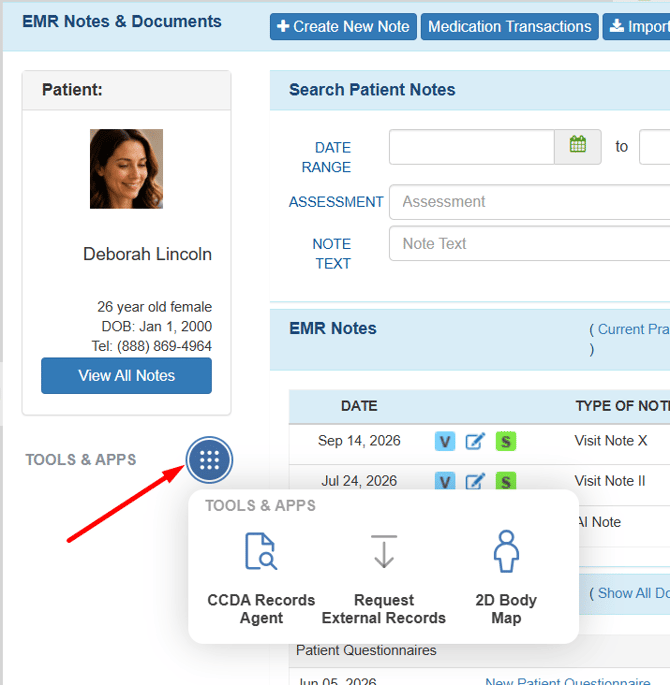
You can also access the App Launcher directly from the patient’s EMR All Notes:
- In your EHR, from Today’s Appointment List or through patient search, right click a patient name and open the patient’s EMR All Notes.
- Hover over the Tools & Apps Launcher within the patient’s notes to display the applications available.
For questions, additional information, or app activation, please contact your Account Manager.