
To: WRS Health Users
From: WRS Development Team
Date: 07/11/2024
Re: Questionnaire Attachments in an EMR Note
Items in This Release
- Questionnaire Attachments in the EMR Note
We are excited to announce the release of a new feature aimed at enhancing the experience of healthcare providers by improving the management of questionnaire attachments within the EMR note. This enhancement ensures a more efficient workflow, enabling providers to focus less on administrative tasks and more on what matters most- patient care.
Previously, accessing information from attached questionnaires was done through the View Note option. In our latest update, you can now effortlessly view the list of questionnaire(s) attached to an open note by simply selecting the new Attachments tab.
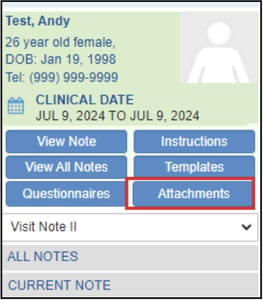
The Attachments tab provides a comprehensive list of all questionnaires currently attached to the note, including details such as the date of attachment and the user who added them.
Simply click on a questionnaire’s name to view both the questionnaire and the responses.

You can easily manage attachments directly from the Current Note Attachments tab by clicking the Remove option to remove a questionnaire from the note.
