
To: WRS Health Users
From: WRS Product & Development Team
Date: 11/10/2026
Re: Credit Card Collection during Patient Self-Registration
Items in This Release
- Credit Card Collection during Patient Self-Registration
The patient’s self-registration workflow through the Patient Portal has been enhanced to support credit card collection during registration. Previously, patients could complete self-registration without providing credit card information.
With this enhancement, practices can now require patients to provide their credit card on file as part of the self-registration process. When enabled, patients must enter the required credit card information before completing registration.
This update helps practices collect payment information earlier in the registration process, reducing manual follow-ups and administrative work before appointments.
What’s New
The Credit Card on Self-Registration enhancement introduces the following functionality:
- Ability to require credit card information during Patient Portal self-registration.
- New WRS Admin-level setting to enable the feature.
- New Practice-level setting to control credit card collection during self-registration.
- Required credit card information must be provided before patients can complete self-registration when the feature is enabled.
What This Means for Your Practice
- Practices can collect credit card information during patient self-registration instead of requesting it separately before appointments.
- Patients are prompted to provide their credit card information as part of the registration workflow.
- Required payment information is collected before registration can be completed.
- Administrative staff can spend less time following up with patients to obtain missing credit card information.
- Practices have control over whether credit card collection is required during self-registration through the Practice-level setting.
How It Works
Configure the Setting at the Practice Level
- Navigate to Administration > Settings > Practice Settings > Credit Card on Self-Registration.
- Enable the setting to require patients to provide credit card information during Patient Portal self-registration.

Note: The Practice-level Credit Card on Self-Registration option will only be visible when the feature is enabled at the WRS Admin level.
Patient Portal Self-Registration
-
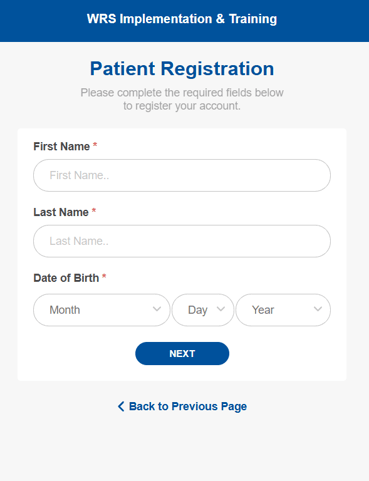
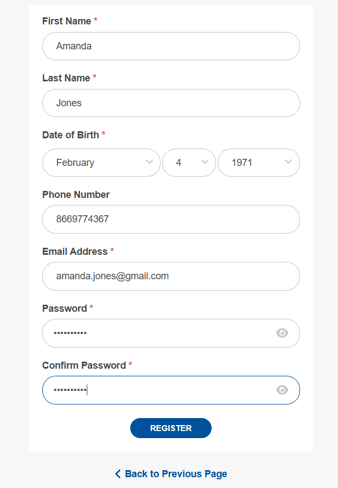
When the feature is enabled for the practice, patients completing self-registration through the Patient Portal will be prompted to enter their credit card information.
-
Patients must provide the required credit card information before they can complete the self-registration process.
Self-Registration
Required Payment Method
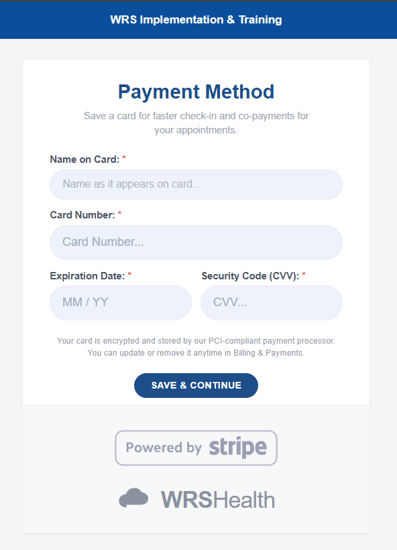
This ensures that the practice can collect the necessary payment information as part of the patient's registration workflow.
For questions, additional information, or app activation, please contact your Account Manager.