To: All System Users
From: WRS Development Team
Date: 03/14/2023
Re: Correctly Populated Copay – EHR & PCM
Items in This Release
- Copay Field Population – Effective 3/16/2023
TO BE RELEASED MARCH 16, 2023
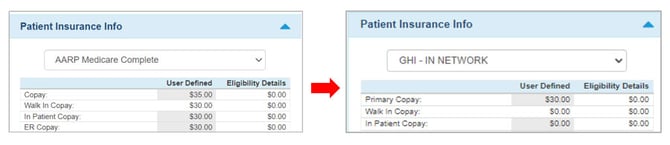
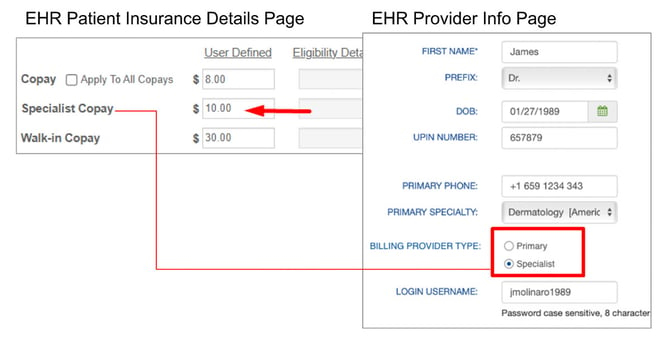
WRS Health has modified the copayment field to be correctly populated by provider type. Previously, the copayment field in the patient account during check in, check out, and patient self check in was populated by the standard “copay” field from insurance details. With this modification, the copayment field will be populated based on provider type.
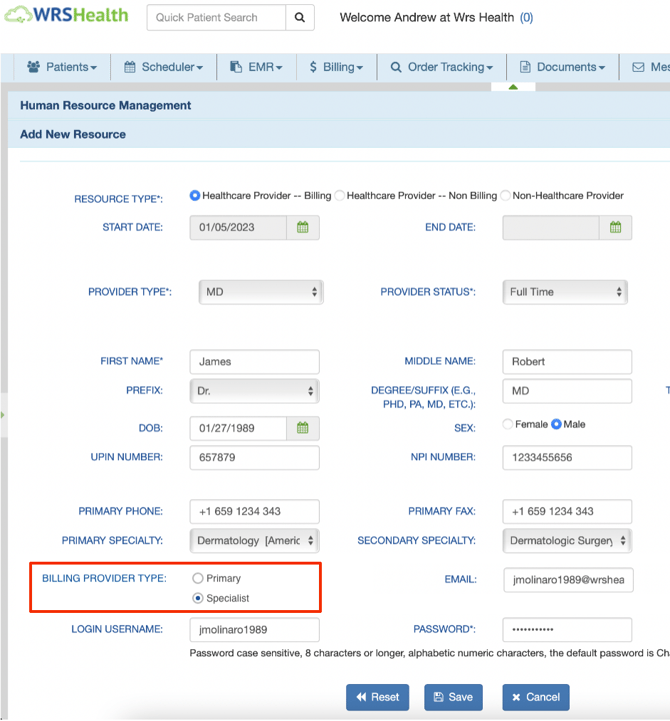
This field will be defaulted to “specialist” upon implementation. Here’s how to change the provider type:
- Select Administration from the main navigation bar.
- Hover over Resource Management and select Resource Setup from the drop down menu.
- Once the Human Resources Management screen appears, select the name of the resource you would like to edit.
- Then, on the General tab, you may select either Primary or Specialist from under Billing Provider Type.
- Please be sure to save any changes made.
In addition to this change, the “copay” field in insurance details will be renamed to “Primary Copay”.