
Available Time Search
GO TO
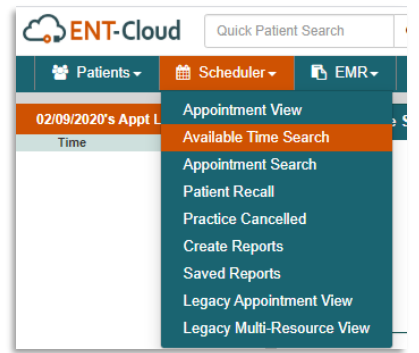
Scheduler → Available Time Search
STEPS
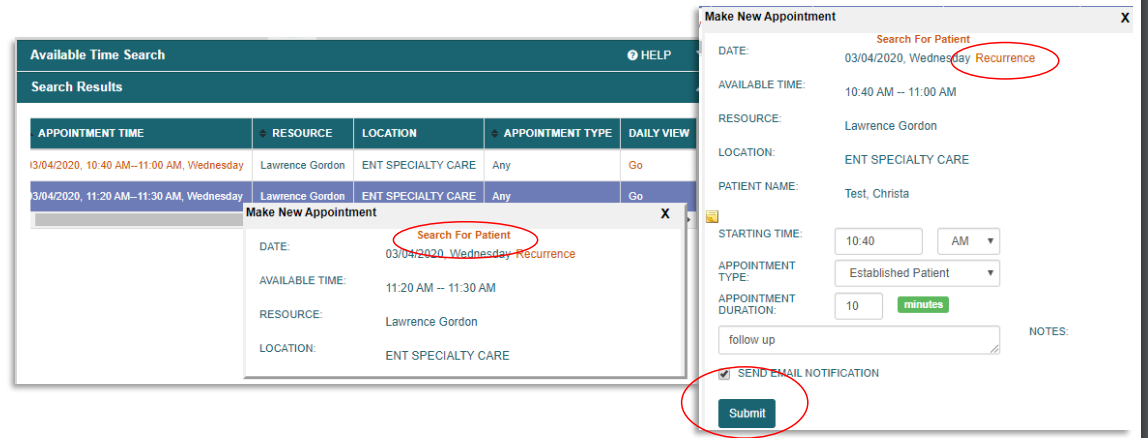
- Set filters
- Search
- Select desired appointment time
- Search for patient to schedule
- Set recurrence if desired, OR remove existing recurrence
- Enter appointment details
- Submit
Scheduler / provider available times are set up during administration and will appear as white time
blocks labeled “Any” in the Scheduler Appointment View.
NOTES
- Please note that once scheduled in bulk, appointments can only be edited or cancelled
individually - This feature is especially helpful when the same patient needs to be scheduled at the same time
on multiple occasions, for a range of time - You can view the available time slot in the Scheduler Appointment View by selecting “Go” under
“Daily View” for the desired available time