
Skip to content
English
  • There are no suggestions because the search field is empty.

Revoking Direct Secure Messaging Protocol

  1. WRS receives notice that a client does not wish to to renew Direct Secure Messaging.
  2. Login to EMR Direct on the renewal date.

    1. Search for practice and copy the direct domain name.
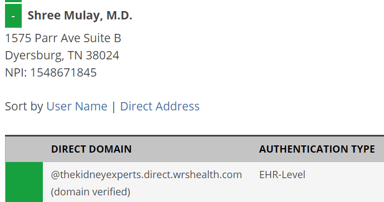
https://lh4.googleusercontent.com/u7oqiLEdKkobgDsC0ZV9b__6nXVipjoTmLQjhc348DW76QrbNC5neYRvOyzz6Hhxm7coSNLlI40acqMWDmEjSP7CSMsCISCWvfGyBsc0R9da_C569apOUVrbSH_b9YHVeqFtsdtR


    1. Go to Your Certificates section and select the Revoke button.

https://lh5.googleusercontent.com/p-B697K-maAaqHHL-xyeZk4OhqrN_P0nLtaLKveZx81W7T8NFkNGco5lBAc-o1z4aO62xhRye-q4BK-3p_Jt5V29CpvznmCnUVzUGfe5BMVAEodIsTQCFtT0aorpFcqoYPjdrK6J

  1. Send an email to setup@wrshealth.com requesting them to disable Direct Messaging in WRS Admin.
  2. Login to WRS > Administration > System Settings > Direct Setup
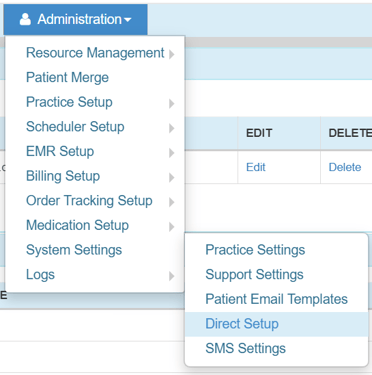
https://lh3.googleusercontent.com/JULwTOdSp_dlctrzlBzxSUKuBUUK4ocsUNVy6BSqxjpEedifgAj7pOr5eh8cCxloBsLRBEc3znE_G15H_IExZr3d0J_axy9wY4_QEo5OQyy1AFa2RQIe1kxYmhQRvHi3Q9NykZG6


    1. Delete Practice Portal and Patient Portal.

https://lh4.googleusercontent.com/dMm1DZzrccehE8UeQkbP2yDaZLgbZ-d3vmHmvxXHnknyslQXKZ4krerxF5vaKm-H34xK7-jJXArlv46I6tSkIUJAIKVRiOGyrVnxTcnW1WiTNwxaYVmQaNk6frXrl4LqMFdrDmBK


    1. Scroll down to the bottom of the page, select Uncheck All and Save.
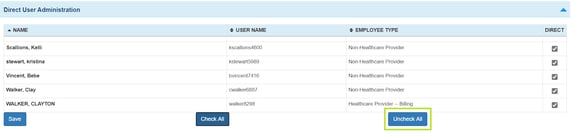
https://lh3.googleusercontent.com/xjVDb4B6vpnuyIxxWZHLRwBhKjSjwq0W14wbl9gKdXJDUq58gVcVTcNP5LOgf1sERwYqYVBz_txpLX3MyASSpB61p4oYJn6LIMCeO-lWyb_eX_s1ejCVLgJVvVQ0AtVdVXDnmaeo