
There must be a documented request to retrieve a drop or unsign a note1. Provider requesting note to be unsign/drop must complete the Note Attestation Form (New) and send it back to WRS.
2. WRS will unsign the note and inform the provider.
3. Provider will be the one to drop the unsigned note.
WRS protocol is not to unsign or drop notes. WRS clearly identifies the patient name and specifics (DOB, SSN, address, chart number, etc), as well as having the "patient picture" available on each page of the note to ensure the patient being addressed is correct. Users can also use EMR All Notes page to verify that you are in the correct patient chart.
How to look up user who dropped a note:Provided that you have permissions, you can view the logs regarding note deactivation by:
1. Administration > Logs > Clinical
2. Set the filters esp. Event Type filter to EMR Note and Action Type filter to Delete.
There must be a documented request to retrieve a deleted note
1. Go to WRS Admin Management > EMR Management > Manage Notes
2. Select Practice and type in note ID (if available) and patient information.
3. Filter Note Active Status to Deactivated.
4. Hit Search
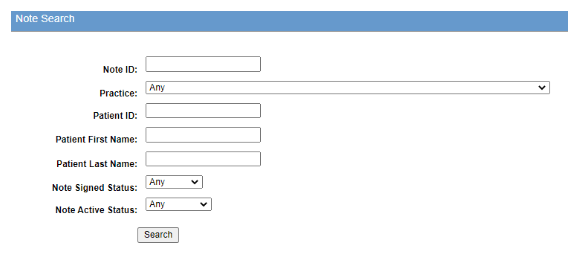
5. In the Results page, select the Activate button

6. Inform practice and update ticket.