
To create a default plan for a medical diagnosis (ICD), go to the Assessment and Plan page of an EMR Note
1. Add a diagnosis code to the note.
2. Enter default comment in the Plan box.

3. Click the D button to save the entered text as the default comment for the selected ICD code.
To remove or change a default plan, erase the text and click D.
To create a default comment for a procedure (CPT) code, go to the Orders and Procedures page of an EMR Note
1. Add a procedure code to the note.
2. Enter default comment in the Comment box.
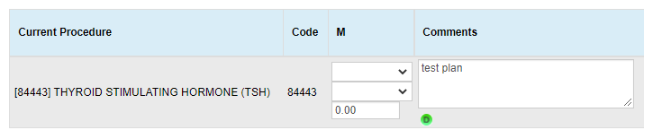
3. Click the D button to save the entered text as the default comment for the selected CPT code.
To remove or change a default comment, erase the text and click D.